Where the source goes missing
A visitor clicks an ad, lands on your page, reads, and taps the WhatsApp button. Two minutes later a message arrives on your phone. The ad platform saw a click. GA4 saw a session. Your front desk sees a name and a number. Nothing joins the three, so the booking that follows is credited to Direct or to nobody.
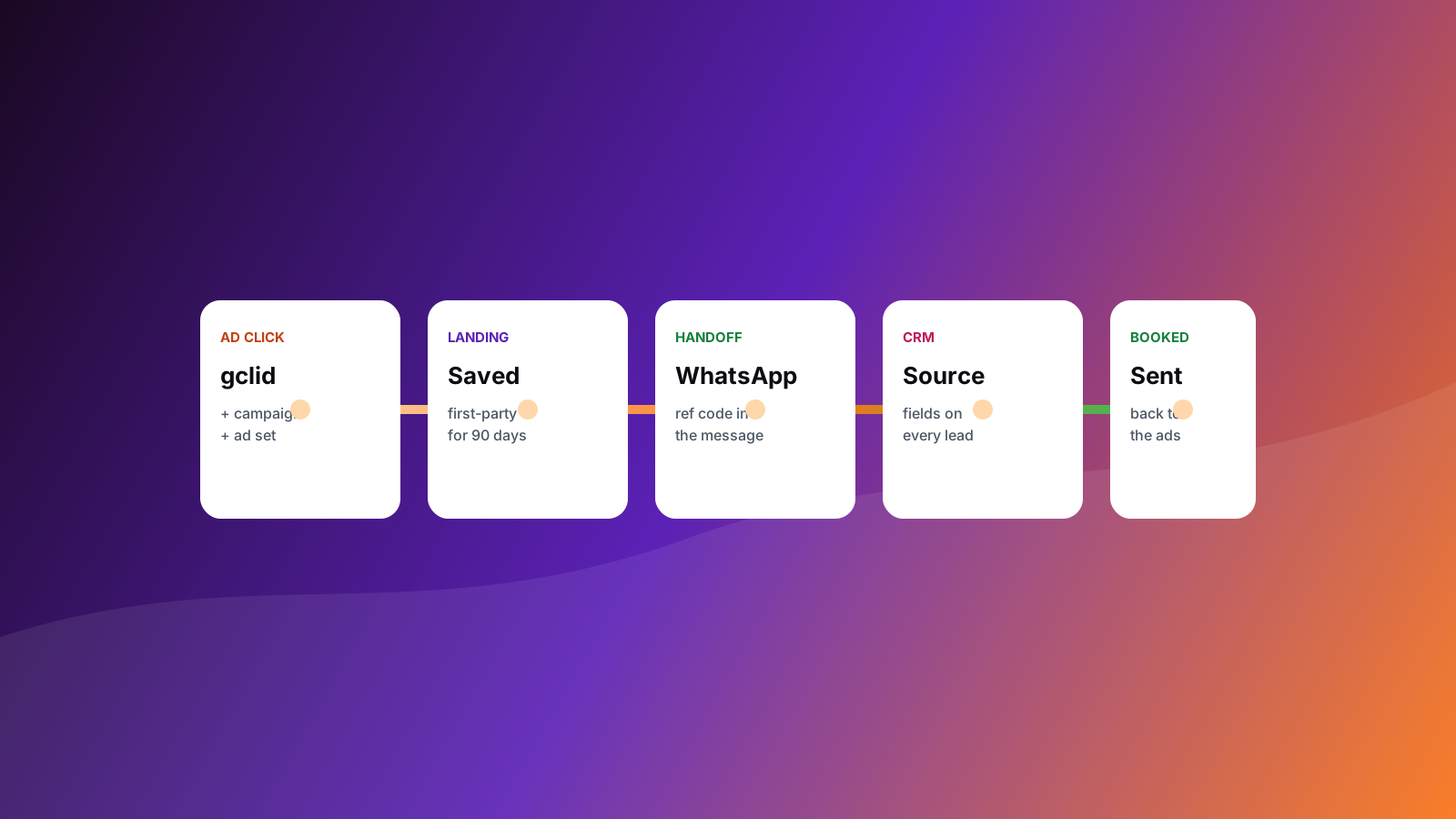
The fix is not a better dashboard. It is a chain of small handoffs, each one carrying the same identifiers forward.
Layer 1: save the source on landing
When a visitor arrives from an ad, the address carries identifiers: gclid for Google Ads, gbraid and wbraid for iOS-related Google traffic, fbclid for Meta, plus your utm_ tags. They vanish as soon as the visitor clicks to a second page.
- On the first page view, read these values from the address.
- Store them in a first-party cookie or local storage, with the landing page and a timestamp.
- Keep them for the length of your sales cycle, commonly up to 90 days, and only as consent allows.
Layer 2: carry it into every form
Add hidden fields to each lead form and fill them from storage when the page loads: click ID, source, medium, campaign, landing page. Name them exactly as your CRM names its fields, so the values arrive without a mapping step.
The same rule covers the booking tool. If it supports hidden or custom fields, pass the source into it; if it sits on another domain, add that domain to your cross-domain settings so the session stays whole.
Layer 3: carry it into WhatsApp
A WhatsApp tap leaves your site, so the browser cannot carry anything across. Two methods close the gap.
- A reference code in the message. Pre-fill the chat with a short code, such as "Hi, I'd like to book. Ref A7K2". Your server stores the saved source against that code when the visitor taps. When the message arrives, the code finds the source.
- Click-to-WhatsApp ads. When the ad opens WhatsApp directly, the WhatsApp Business Platform webhook for the first message includes referral details, among them the ad's click ID. Save it on the lead the moment the conversation starts.
Either way, the lead leaves WhatsApp with a source attached, and your team can still read the conversation normally.
Layer 4: store it on the CRM record
Give every lead one record with these fields: source, campaign, click ID, landing page, and a status that moves through new, contacted, booked, attended and paid. Two habits keep the record accurate:
- The status changes when the real event happens: booked when the slot is held, attended when the visit is logged, paid when the invoice clears.
- The no-show is a status of its own, so a campaign that fills the calendar with people who never arrive is visible.
Send the outcome back to the ad platform
Ad platforms optimise toward whatever they are told counts. If they only hear about leads, they find more leads. If they hear about attended appointments, they learn to find people who attend.
- Google Ads. Import offline conversions using the saved click ID, with a conversion action for booked and another for attended.
- Meta. Send booked and attended events through the Conversions API, using the click-to-WhatsApp click ID for WhatsApp conversations, or the browser identifiers and hashed contact details you hold with consent for form leads.
Prove it with one test lead
- Click one of your own ads from a clean browser profile, after accepting consent.
- Submit the form, then repeat from a second ad with the WhatsApp button.
- Open both CRM records. Source, campaign and click ID should be filled in.
- Mark one as booked and confirm the conversion arrives in the ad platform.
If a field is empty, the layer before it is where the chain broke. The free analytics scan checks the visible half for you: click-ID capture, source fields on forms and the CRM behind them, and ranks what to fix first.